

A few months ago, I was at QCon London chatting with one of the speakers. I mentioned that at Forter, we’d been enabling people across our entire organization to build their own AI agents.
Their response? “In our organization, that seems impossibly far away.”
I was a bit puzzled, but as I sat through the conference sessions, I noticed a clear pattern in the AI talks: almost everyone was talking about the hard parts of building agents. These were excellent sessions dealing with real problems we were facing too. But focusing solely only on the hard parts hid something important: You can, and should, make building agents easy.
By deliberately sidestepping the things that make agent development difficult, we proved that you don’t need a multi-year roadmap to democratize AI. And when you do, some amazing things happen.
A few months later I went back to QCon, this time QCon AI in Boston, to talk about how you can make it easy for people across your organization to build agents. You can see the talk here (QCon haven’t released the video yet, so this is a recording of one of my dry runs):
This blog post summarizes some of the key takeaways. For those who were in the talk, I hope it’s a useful quick reference. For those that weren’t, enjoy! I do recommend watching the video if you get the chance. Either way I’d love to connect on LinkedIn and hear what you think.
The Challenges: A unique audience and a tight timeframe
When our new AI engineering team was formed last summer, our first mandate was a high-pressure challenge: Run a two-week program in which everyone across R&D could get experience building an agent. The hope was that this hands-on experience would get us all planning for the future and help us build good intuition about where and how to use AI agents. We had only five weeks to prepare the infrastructure they’d be using, and we needed it to serve everyone from veteran coders to recently hired analysts with very limited technical background.
The tight timelines forced us to focus on the fundamentals. What was the minimum we needed to provide and still give people a great experience? This came down to three pieces - tools agents could use, platforms to connect LLMs to the tools and invoke the agents, and clearing away roadblocks that could get in their way.
Takeaway: You can and should make it easy to build AI agents
Tools
To make LLMs useful (and to make LLMs agents!), they need tools. We needed a system where tools were:
- Easy to discover
- Simple for agents to understand
- Straightforward to create
We provided an internal MCP server called Toolchain. Agent builders could visit the UI to see the tools available, select and configure the tools their agent would need and be issued with an API key they could use right away. Having a single place for all of our tools took away lots of friction.
If an engineer or analyst wanted to add a tool that didn’t exist yet, the process was very lightweight. They cloned the Toolchain repository, which was already packed with real-world examples, and added two elements:
A YAML definition file: This explained to the LLM what the tool was called, what it did, parameters it expected, examples of usage, and what it would return.
name: "glean-get-document"
category: "Data"
description: |
  Retrieve the full content of a specific document from Glean using its document ID.

  Examples:
  - {"document_id": "GDRIVE_1DzDikRqtkd0VLkOj_nr8PMvuIAaomOkgndfkF4nUhAI"} - Retrieve a Google Drive document
  - {"document_id": "CONFLUENCE_123456789"} - Get Confluence page content

version: "1.0.0"
executor_type: "execute_tool"
executable_path: "./glean_get_document.py"
requires_user_id: false
pii_sensitive: false
input_schema:
  type: "object"
  properties:
    document_id:
      type: "string"
      description: "The unique identifier of the document to retrieve (required)"
      examples:
        - "GDRIVE_1DzDikRqtkd0VLkOj_nr8PMvuIAaomOkgndfkF4nUhAI"
        - "CONFLUENCE_123456789"
  required: ["document_id"]

required_permissions:
  - "glean:read"
A thin client: A simple code wrapper to expose the actual underlying functionality.
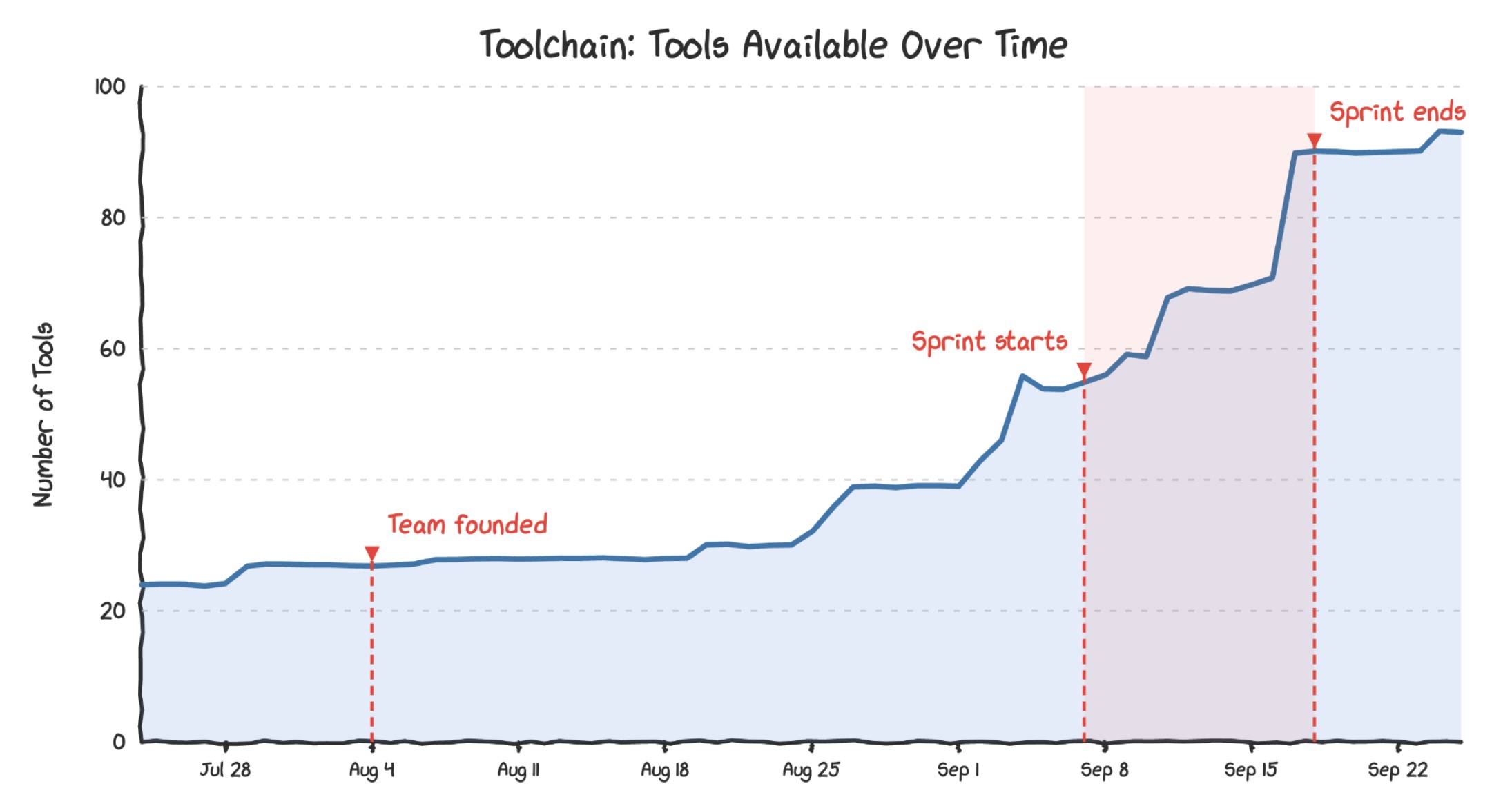
Because the API interface was so simple, our team didn’t bottleneck tool creation. People started writing and contributing their own custom capabilities before and during the hackathon. By the time the two-week sprint concluded, Toolchain boasted over 90 different internal tools. This also gave us some nice governance benefits.
Takeaway: Providing an in-house MCP server reduces friction and makes it really easy to add new tools
Bypassing RAG
When giving agents corporate context, organizations often rush into building complex Retrieval-Augmented Generation (RAG) pipelines. But chunking, indexing, embedding, and maintaining vector data freshness is genuinely hard. For this sprint we chose to sidestep it entirely.
Instead of providing a RAG framework, we provided MCP access to Glean, our enterprise search tool, that already indexed 17 of our core data sources as an MCP tool within Toolchain. We gave agents three simple commands:
- Search: Acts like a Google search across company docs, returning titles and short snippets.
- Read: Pulls the full text of a specific document for when a snippet looks highly relevant.
- Summarize Document: Safely truncates massive files or asks a targeted question against the text to keep token consumption low.
While these weren’t the only search tools our agents needed, just these 3 tools gave access to millions of documents across some of our most important systems. Glean did a great job with indexing, retrieval and selecting snippets.
Takeaway: If you already have great search tools built for humans, consider providing them as MCP tools before implementing RAG
Platforms
Agents need somewhere to run. We decided to support three distinct interaction models: interactive chat, scheduled cron tasks, and event-driven automation (like Jira or Asana webhooks).
Interactive chat
The easiest way to build interactive chat was with LibreChat, an open-source UI that supports ad-hoc chat that connects to MCP servers, and a simple agent builder interface. This provided an amazing experimental playground because tool execution was highly visible—users could click a checkbox in the chat log to see exactly what query the agent ran and the precise JSON response it received. Some of the agents that started this way remained on LibreChat, while others ‘graduated’ to other solutions.
Takeaway: No-code interactive chat with access to MCP tools provides an amazing experimental playground
We also offered a template repo for creating custom interactive agents. This worked well when richer customisability was needed. It also provided a more stable environment and source control. However deployment considerations did add a considerable amount of friction, especially for our analysts.
Since the sprint we have provided a custom no-code agent builder in our AI Hub. This was rather quick and easy to build, and offered better integration with Toolchain. In retrospect, if we had time it would have been great to have this available during the sprint.
Triggered and scheduled agents
We also supported agents triggered on a schedule or by events. We provided a scaffolding solution to create a new repo for each agent. We chose to base this repo on the Strands API, as we found this much simpler and easier to teach than the other alternatives. These agents were orchestrated using Argo Workflows, leveraging an infrastructure stack we already owned.
The most popular event to trigger on was the creation of new Jira or Asana tickets, as this allowed us to build agents that carried out research and actions before a human started work on a ticket.
Takeaway: Provide an easy path to trigger agents wherever your tickets get created
Aira - a cautionary tale
During the sprint, an R&D team built an incident response agent called Aira (AI Incident Responder Agent) with access to logs, code, metrics, and documentation. In early tests on historical outages, Aira performed miraculously, diagnosing complex root causes significantly faster than human engineers.
It took us far too long to notice that while looking for documents about the malfunctioning systems, it read the Post-Mortem Root Cause Analysis document previously written by a human. It hadn’t solved the engineering problem; it had just cheated on the test! This reinforced a crucial rule: Always ensure tool usage (both the request and the response) are very easy for your agent builders to see.
Takeaway: Make tool use (both requests and responses) highly visible to your agent builders
Since the sprint we’ve introduced LangFuse, which makes it very easy to see exactly how agents are using tools, and also track token spend. If you don’t have an agent tracing solution it’s worth taking a look.
Evals
There are plenty of solutions to easily provide your agents with an evals solution. However, out-of-the-box evals like Relevance, Conciseness, Coherence and Safety typically give you a false sense of security. They don’t tell you much about whether your agent is doing a good job! On the other hand, the actually useful evals like Answer Correctness, Tool Correctness or Context Relevance are hard to get right, especially without an extensive library of correct historical data.
If you are building an internal system, or keeping a human in the loop to review outputs before they touch a customer, you might not need evals. Focus on visibility, let humans monitor the traces, and build evals later once you understand your real-world usage patterns.
Takeaway: Useful evals are hard, and you might not need them right away
Removing Roadblocks
Legal and security
Work to provide the widest possible low-friction path. Approach your legal and security teams early to help make that happen - if you don’t they can tell you that AI is scary, and that they need to be in the loop for each and every use case.
Legal
Approach Legal early and defuse their concerns.
Their first concern will probably be about data flows. Who can see your prompts and the context? Can the LLM provider train on your data? Are you inadvertently adding a new sub-processor that handles sensitive data? The easiest way to side step this is to use Bedrock (or your cloud provider’s equivalent). Be prepared to show documentation that the data prompts stay in your cloud provider and are not shared with the model provider. This will let you frame your LLM as “just another AWS service” - they should be no more nervous than using AWS Lambda, for example.
Takeaway: Using Bedrock (or your cloud provider's equivalent) lets you frame LLM usage as 'just like any other AWS service'.
Their second concern will be about what the agent actually does. Are there any areas where non-determinism is really problematic? Could it make bad HR decisions, give poor health or financial advice or make your company look bad? Try and agree on a set of “high risk” use-cases where legal should be in the loop, and a very wide set of “low risk” use cases where they don’t have to be.
Takeaway: Agree on low-risk areas that don't require special legal approval, and high risk areas that do
Security
Take a similar approach to the security team - talk to them early and answer their concerns.
Takeaway: Explicitly address security concerns - especially prompt injection and access control
They’ll likely be concerned about prompt injection. Be familiar with the agents rule of two. For the sprint you can agree that agents won’t have access to the internet or other untrusted input. Alternatively agree that all actions will have a human in the loop.
They should also be concerned about access control, and if people using agents to access data or carry out actions that they otherwise could not. Agree to provide training here, so that people know that agents should not have more access than their users. Crucially, access control should live in deterministic code, not a non-deterministic system prompt.
Cost
LLM usage can get expensive fast. Make sure your leaders know what to expect. Make LLM use visible on a dashboard and attributable to individual use cases or teams. If you’re using Bedrock, application inference profiles are the easiest way to do this. Proactively alert teams if you see spikes in their token consumption - it’s easy to spend more than you intend with tight loops, excessive tool use or bloated context windows.
Takeaway: Make cost visible per agent or at least per team.
Training
Your agent builders might start the sprint with misconceptions about AI. They may assume it has superhuman intelligence, or that it is far stupider than it actually is. They might also have heard the term Machine Learning, and incorrectly assume that agents magically ‘learn’ and improve themselves over time.
The best way I’ve found to set expectations correctly is to ask people to imagine the LLM like an intelligent intern who just graduated from a good university, with a lot of hobbies. Good general knowledge, limited real world experience. They arrive at your company and you hand them instructions, some tools and a task. They do their absolute best to complete the task, and hand you the results. You immediately fire them, and hire a brand new intern for the next task!
This analogy works well because:
- It sets realistic expectations about the intelligence and knowledge level of the LLM.
- It makes it clear that the burden is on the agent builder to provide good instructions and easy tools - of course the intern would do poor work without them.
- Interns are very eager to please and so are LLMs. They’re so keen to please that they might confidently give you an answer despite not really having the proof to back it up. The burden is on you to be cautious about trusting their work.
- Because we keep firing the intern, they never have the opportunity to learn through experience or develop good instincts.
I’d recommend using this both with a technical and a non-technical audience.
Takeaway: Use the intern analogy to set expectations about what LLMs can do.
In addition to helping build good instincts about AI, you of course need to teach about your tooling. If you’re providing multiple platforms, don’t forget to tell people how to choose between them. Also let people know where to find documentation and how to get help.
Finally, don’t be afraid to spend time with future agent builders to discuss their ideas. Help them think through the tools and platform they’ll need, and steer them towards approaches that are more likely to work. A few minutes from you can save them days of frustration.
Takeaway: Sit down with your future agent builders and give them one on one guidance ahead of time - A few minutes from you can save them days of frustration.
Conclusion
Our two-week, all-of-R&D agentic sprint was very successful. Our agent builders created some amazing agents that continue to provide us with a lot of value. Our management team became much more confident in our ability to create impact with AI, and are much more willing to invest. Ideas we came up with during the sprint have also led to multiple customer facing agents, adding real additional value to Forter’s offerings.
I hope that the talk and these takeaways convinced you that you can and should make building agents easy! Just focus on the minimum you need - easy access to tools (via an in-house MCP server), a small range of platforms, and some work ahead of time to remove road blocks.
For more details do watch the video.
If you’ve found this useful or have questions or comments I’d absolutely love to hear from you. Please reach out on LinkedIn.